
How to Fix QuickBooks Error 3180: Complete Step-By-Step Guide

QuickBooks Error 3180 is a common synchronization issue that occurs when data fails to transfer between QuickBooks Desktop and QuickBooks POS. This error also occurs due to incorrect sales tax settings, damaged payment items, or improper account mapping, which can disrupt the processing of sales receipts and financial transactions.
If this issue left unresolved, it may lead to missing transactions, duplicate entries, and workflow interruptions. In this blog, we have provided you with the causes and proper troubleshooting solutions to fix Error 3180 QuickBooks to restore smooth operation.
Quick Overview of QuickBooks Error 3180
|
Parameter |
Details |
|
Error Name |
QuickBooks Error 3180 |
|
Error Code |
3180 |
|
Error Message |
Status Code:3180. There was an error when saving a Sales Receipt. |
|
Description |
QuickBooks Error 3180 occurs when syncing data between QuickBooks Point of Sale (POS) and QuickBooks Desktop fails due to incorrect account mapping, damaged company files, or tax setting issues. |
|
Category |
Syncronization/POS Integration Error |
|
Common Causes |
Incorrect sales tax settings, damaged company data, duplicate accounts, invalid account mapping, corrupted POS data, outdated QuickBooks version, or inactive accounts. |
|
Affected Versions |
QuickBooks Desktop and QuickBooks Point of Sale (POS) versions are involved in financial data synchronization. |
|
Quick Fix |
Verify and rebuild company data, check sales tax mapping, correct account settings, update QuickBooks and POS, and retry synchronization. |
Issues You May Notice Due to QuickBooks Error Code 3180
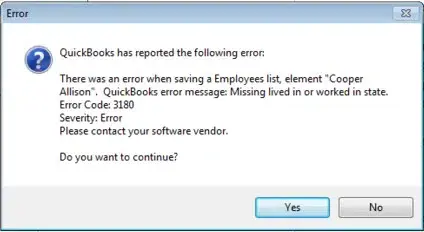
Here are the common signs of QuickBooks Error Code 3180, which include;
- Failure to save any sales receipts.
- Inability to sync financial data between QuickBooks POS and Desktop.
- Missing or incomplete transaction records.
- Sluggish system performance during data transfer.
- Frequent interruptions during the financial exchange process.
- Errors while accessing mapped accounts or sales tax items.
Latest Article: QuickBooks Error 15101 When Updating Desktop or Payroll
Reasons Why QuickBooks Status Error Code 3180 Occurs
QuickBooks Status Code 3180 may arise due to problems with your tax payable account or sales tax items. Other factors that cause this issue are as follows;
- Failure to save any sales receipts.
- Inability to sync financial data between QuickBooks POS and Desktop.
- It may also appear due to missing or incomplete transaction records.
- Sluggish system performance during data transfer.
- Frequent interruptions during the financial exchange process.
- Issues faced while accessing mapped accounts or sales tax items.
Easy Troubleshooting Steps to Fix QB Error 3180 Instantly
Now that you know the reasons for the appearance of QB Error 3180, it’s the best time to fix the issue and continue working without any hindrance.
Method 1: Merge Duplicate Payment Items in QB Desktop
- Open QuickBooks Desktop and move to the List option.
- Click the Item List option > Include Inactive.
- Select the Type Header, and it will sort out the list in an alphatic manner.
- Modify the item names in the POS application.
- To rename, right-click on the payment item having POS at the start.
- Click Edit items and add OLD at the end of the file name.
- Select OK to save the changes.
- Now, run a financial exchange from the POS application.
- Merge the duplicate items in QuickBooks Desktop.
- To merge the items, right-click on each payment having OLD at the end and choose Edit Item from the list.
- Remove OLD from the payment and hit OK.
- You will get a pop-up for merging the items.
- Hit Yes for the confirmation.
Method 2: Allot a Vendor to the Sales Tax Item
Assigning a designated vendor to each sales tax is important for proper account management. Any issue when assigning an item may result in QuickBooks Status Error Code 3180.
- Launch QuickBooks Desktop and click the List menu.
- Choose Include Inactive after selecting the item.
- Now, sort the list and filter by Type.
- Finally, verify that every sales tax item has a tax agency associated with it.
More Fixes: A Guide to Troubleshoot QuickBooks Error 15215 Easily
Method 3: Choose Tax Preferences in QuickBooks POS
Incorrect sales tax preferences are another reason that causes Error 3180 in QB.
- Open the QuickBooks Desktop POS and click the File menu.
- Select the Preferences option and hit the Company tab.
- Go to the Financial menu and choose the Accounts option.
- Verify that the QuickBooks Sales Tax Payable is listed in the Sales Tax list from the Basic and Advanced tabs. Change if it’s not already mentioned, and start running the financial exchange.
Method 4: Rename Your Payment Methods
- Open QuickBooks Desktop and go to the Lists heading.
- Choose the Customer & Vendor Profile Lists option.
- Now, click the Payment Method list and hit the Cash method.
- Go to the Edit payment method and check whether the payment method field contains “X” at the start.
- Next, right-click on Cash methods and select New option.
- Rename the payment method to Cash.
- Once again, start with the Financial Exchange and rename all of the payment options if required.
Method 5: Check that the Receipt isn’t Paid Out Using Sales Tax Payable
- Open QuickBooks POS and click the Sales History option.
- Now, right-click on any of the given columns and select Customise Columns.
- Make sure that you have selected the QuickBooks Status.
- Locate the receipts that aren’t completed yet.
- Select the Receipts option if you get any of the receipts that aren’t paid out to Sales Tax payable.
- Choose the Reverse Receipt option and hit Recreate the paid out by using a non-sales tax payable account.
- At last, run the financial exchange to see if the QuickBooks Desktop Error 3180 exists.
Method 6: Repair the Damaged Payment Item
At times, a damaged payment item while saving a receipt may trigger QuickBooks Error 3180. To resolve the issue successfully, you must identify and repair the damaged payment item by following the troubleshooting steps outlined below.
- Open QuickBooks Desktop and go to Lists > Item List.
- Enable Show Inactive Items and sort by Type.
- Locate Point of Sale payment items and open them for editing.
- Rename the item by adding “OLD” to the name.
- Run Financial Exchange to merge duplicate items.
- Re-edit the item and remove the “OLD” prefix.
- Click OK and confirm changes with Yes.
Tips to Avoid QuickBooks Desktop Error 3180
Follow these practices to prevent QuickBooks Desktop Error 3180 in the future.
- Try updating QuickBooks Desktop and POS regularly.
- Make sure accounts are mapped properly.
- Make sure not to include any duplicate account entries.
- Consider creating a backup of QuickBooks data frequently.
- Check the tax settings before syncing transactions.
- Review your company files regularly.
Continue Reading: QuickBooks Error 2107: Payroll Update Error Fix Guide
Final Thoughts
QuickBooks Error 3180 can disrupt accounting tasks by preventing smooth data synchronization between QuickBooks Desktop and POS. Fortunately, it can be resolved by checking sales tax settings, verifying company data, updating software, and correcting account mapping issues. Following these troubleshooting steps and preventive practices will help maintain seamless QuickBooks operations, prevent recurring errors, and ensure accurate financial record-keeping for your business.
Frequently Asked Questions
-
What is Error Code 3180 in QuickBooks?
QuickBooks Error 3180 is a syncing or data failure issue that indicates QuickBooks can’t process or save a transaction from a connected app or POS system.
-
Is QuickBooks Error 3180 related to sales tax settings?
Yes, incorrect sales tax settings may also cause QuickBooks Error 3180.
-
Can damaged company files cause Error 3180?
Corrupted or damaged company files are one of the root causes that trigger Error 3180 in QuickBooks.
-
What are the common scenarios that trigger QuickBooks Error 3180?
Users may get the QuickBooks Error 3180 while saving a sales receipt or syncing with Desktop POS. It may also trigger while posting General Journal transactions or during financial exchange between POS & QuickBooks.
About The Author

Elora Havencrest
Elora Havencrest is an accomplished Accounting Writer with over 12 years of experience crafting clear, engaging, and informative financial content. She specializes in bookkeeping, tax planning, and financial analysis, making complex accounting concepts easy to understand for business owners and finance professionals.
Elora's dedication to accuracy and clarity ensures her writing not only educates but also empowers readers to make confident and informed financial decisions.
Recent Posts
-
How to Fix QuickBooks Error 6129 When Opening a Company File?
-

QuickBooks Error “The File Exists”: Effective Methods to Fix the Issue
-
QuickBooks Missing PDF Component – Fix PDF & Printing Issues
-
A Comprehensive Guide To Fix QuickBooks Error 7149
-
How to Fix QuickBooks Error 6177, 0 (Easy Step-by-Step Guide)