
QuickBooks Error 15101 When Updating Desktop or Payroll
QuickBooks error 15101 can show up when updating your desktop application or tax table. This can keep you from accessing new features, product enhancements, and the latest tax rates. What’s more is that you will not be able to send paychecks to your employees.
Thus, it becomes mandatory to troubleshoot the update error code 15101 to resume your QuickBooks operations. We will see how to do so in this article.
An Overview of Update Error 15101 in QuickBooks
The table below provides a quick view of the update error 15101 in QuickBooks Desktop
| Parameter | Details |
|---|---|
| Error Name | QuickBooks Error 15101 |
| Error Code | 15101 |
| Error Message | “QuickBooks Error 15101: Failed to reset QuickBooks update.” |
| Description | Occurs when QuickBooks cannot download or install payroll and software updates. |
| Category | Update / Payroll Update Error |
| Common Causes | Incorrect Internet Explorer settings, blocked digital signature certificates, firewall restrictions, or insufficient admin permissions. |
| Affected Versions | All QuickBooks Desktop versions with payroll services enabled. |
| Quick Fix | Run QuickBooks as Administrator, verify Internet settings, and install the digital signature certificate. |
What is QuickBooks Error 15101?
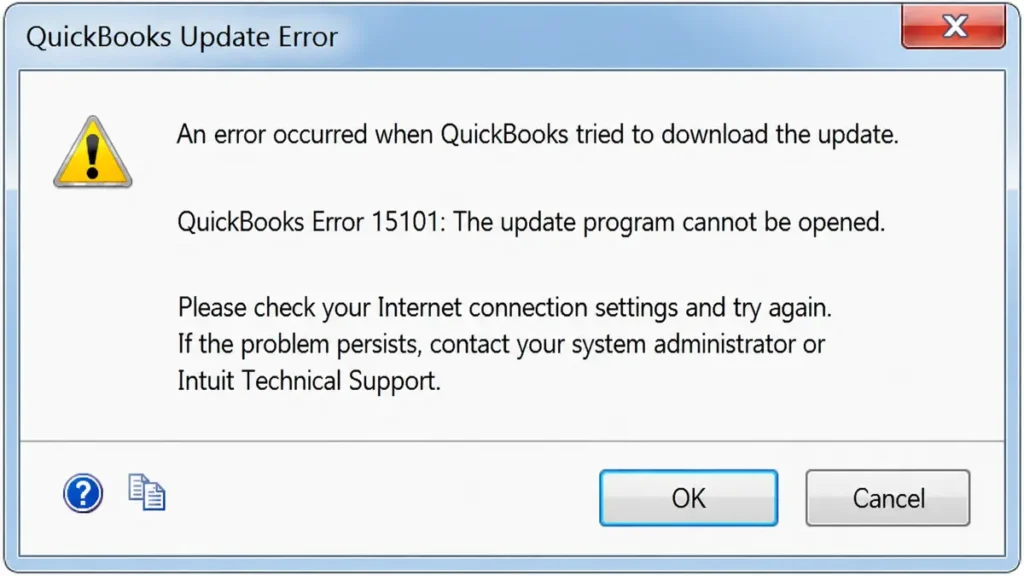
QuickBooks error 15101 is an update error. It is associated with tax tables or software updates in the QuickBooks application.
15101 belongs to the 15XXX series of errors in QBDT. All the 15XXX errors are primarily an issue with the update and may be related to payroll.
Some other common errors in this series are error code 15270, error code 15276, and 15104.
Discover More Topic: QuickBooks Error 6189, 816: Complete Guide to Fix Company File Issues
What Causes Update Error Code 15101 in QuickBooks Desktop?
It is helpful to understand all the possible factors that lead to QuickBooks update error code 15101 to troubleshoot and fix it.
- It is possible that QuickBooks FCS (File Copy Service) is disabled
- System files or QB installation files might be damaged
- Your system might be missing a crucial component required for updates
- Firewall or internet settings might block QB from connecting with servers online and downloading updates
- The Shared Download drive might not be mapped correctly
- Windows might be unable to verify Intuit’s digital signature because it is outdated, missing, or invalid
- The error arises because of a corrupt QB program or tax table
Now, let us proceed to a comprehensive troubleshooting of the problem.
Detailed Steps to Troubleshooting QuickBooks Error 15101
The following steps will help you address QuickBooks error 15101. Go through them one by one and carry them out as instructed.
1. Get the Updates as an Admin
First, launch the QuickBooks Desktop application as an administrator using the following steps:
- Close all the QuickBooks Desktop application windows and the company file.
- Go to the Desktop and right-click on the QuickBooks icon.
- Choose Run as administrator from the list of options.
- When you see a message asking if you want to allow the program to make changes to your system, choose Yes.
Now, retry getting updates.
2. Quick Fix the Program
If there are any QuickBooks windows open, close them. Then run Quick Fix my Program from the Tool Hub.
- Launch QuickBooks Tool Hub. (If you do not have the latest version installed, download and install it first.)
- Navigate to the Program Problems section.
- Click on Quick Fix my Program.
Check if the QuickBooks Error 15101 has been resolved.
Discover More Topics: Fix QuickBooks Error 1601 During Installation or Update
3. Get QuickBooks Digital Signature Certificate
Windows needs to verify QuickBooks’ digital signature certificate before QuickBooks can download updates.
- Navigate to
C:\Program Files\Intuit\QuickBooks. - Right-click on
QBW32.exe. - Select Properties and then open the Digital Signature tab.
- In the signature list, ensure that Intuit is selected.
- Click Details.
- Select View Certificate from the Digital Signature Details window.
- Click the Install Certificate button.
- Keep selecting Next and finally click Finish.
Restart the computer, open QuickBooks Desktop, and check if updates can be installed without encountering Error 15101.
4. Delete a Specific Component
You may need to delete a specific component if the error persists.
- Close all QuickBooks windows.
- Navigate to
C:\ProgramData\Intuit\QuickBooks XX\Components. - Right-click the Components folder and select Delete.
Afterward, try downloading the software or tax table updates again.
5. Repair QuickBooks Program
QuickBooks Tool Hub can also help repair installation issues that commonly trigger 15XXX series errors.
- Launch QuickBooks Tool Hub.
- Go to the Installation Issues tab.
- Click QuickBooks Install Diagnostic Tool and wait for it to launch.
Allow the tool to repair Windows components and the QuickBooks installation. Once you receive a confirmation message, restart the computer for the changes to take effect.
Then, try updating QuickBooks again.
6. Clean Install QuickBooks Desktop
If Error Code 15101 still appears, perform a clean installation of QuickBooks Desktop.
- Uninstall QuickBooks Desktop.
- Do not reinstall it immediately.
- Locate the folders that contain QuickBooks files.
- Right-click each folder and choose Rename.
- Add
.oldto the end of the folder name.
Common folders that may need renaming include:
C:\Program Files (x86)\Intuit\QuickBooks (year)C:\Program Files\Intuit\QuickBooks (year)C:\ProgramData\Intuit\QuickBooks (year)C:\Users\(your username)\AppData\Local\Intuit\QuickBooks (year)
If you are unable to rename a folder, a QuickBooks process may still be running. Open Task Manager, locate any QuickBooks processes, select them, and click End Task.
Finally, reinstall QuickBooks Desktop, activate the product, and install the latest updates.
Read More: QuickBooks Error 15271 – Multi-User Mode Not Working Fix Guide
Final Words
Software and payroll updates are an integral part of the QuickBooks accounting experience, and you need them before you can send paychecks. In this article, we discussed why you run into QuickBooks error 15101 and how to troubleshoot it. This should help you get the updates and resume QB operations.
Frequently Asked Questions
-
What is Error 15101 in QuickBooks Payroll Update?
Error Code 15101 is an update error in QuickBooks Desktop that can appear when you try to install or update tax table updates. In the context of QuickBooks Payroll specifically, the error prevents you from getting revised tax tables and rates, which means you may be unable to process or send paychecks.
-
How Do I Fix a QuickBooks Payroll Update Error?
To address a payroll update error in QuickBooks, you can run the program as an administrator, repair the QuickBooks installation, or install a valid digital signature certificate. Additionally, reinstalling the QuickBooks Desktop application may help resolve the issue if corrupted program files are causing the error.
-
Why Can’t I Update QuickBooks Software?
Several factors can prevent QuickBooks Desktop from updating, including restrictive firewall or internet settings, a missing or outdated digital signature certificate, or a damaged QuickBooks installation. Other possible causes include insufficient user permissions or a disabled File Copy Service.
About The Author

Elora Havencrest
Elora Havencrest is an accomplished Accounting Writer with over 12 years of experience crafting clear, engaging, and informative financial content. She specializes in bookkeeping, tax planning, and financial analysis, making complex accounting concepts easy to understand for business owners and finance professionals.
Elora's dedication to accuracy and clarity ensures her writing not only educates but also empowers readers to make confident and informed financial decisions.